> For the complete documentation index, see [llms.txt](https://ykkim.gitbook.io/ec/llms.txt). Markdown versions of documentation pages are available by appending `.md` to page URLs; this page is available as [Markdown](https://ykkim.gitbook.io/ec/ec-course/tutorial/tutorial-finite-state-machine-programming.md).
# Tutorial: Finite State Machine programming
## Tutorial: Finite State Machine Programming
## Introduction
We will learn how to design a logic with FSM and implement it in C-programming.
## Example 1
### Description
When the button is pressed, (input X=HIGH)
* Turn ON the LED.
Wait for 1 sec.
Button is released during the wait time.
When the button is pressed again, (input X=HIGH)
* Turn OFF the LED.
**INPUT:**
* X: Button Pressed {0, 1}
**OUTPUT:**
* LED {ON, OFF}
**STATE:**
* S0: FAN OFF State
* S1: FAN ON State
### Moore FSM Table
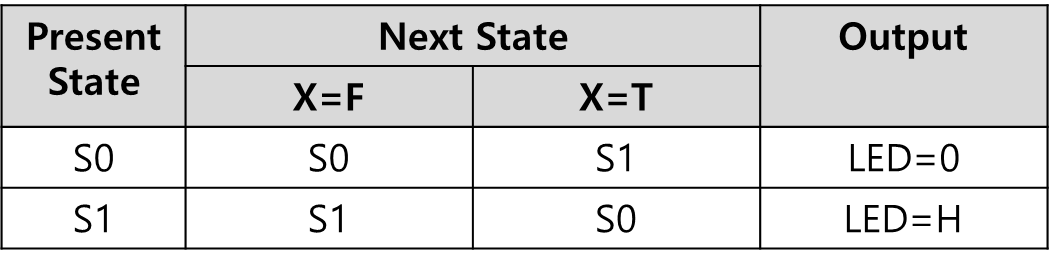 #### Example Code: Moore FSM
{% tabs %}
{% tab title="(STMduino) Moore Example Code" %}
```cpp
// State definition
#define S0 0
#define S1 1
// Address number of output in array
#define LED 1
typedef struct {
uint32_t next[2]; // nextstate = FSM[state].next[input]
uint32_t out; // output = FSM[state].out
} State_t;
State_t FSM[2] = {
{{S0, S1},LOW},
{{S1, S0},HIGH}
};
const int ledPin = 13;
const int btnPin = 3;
unsigned char state = S0;
unsigned char input = 0;
unsigned char ledOut = LOW;
void setup() {
// initialize the LED pin as an output:
pinMode(ledPin, OUTPUT);
// initialize the pushbutton pin as an interrupt input:
pinMode(btnPin, INPUT_PULLUP);
attachInterrupt(digitalPinToInterrupt(btnPin), pressed, FALLING);
Serial.begin(9600);
}
void loop() {
// First, Update next state. Then, Output. Repeat
// 1. Update State <-- Next State
nextState();
// 2. Output of states - Logic
stateOutput();
digitalWrite(ledPin, ledOut);
delay(1000);
}
void pressed() {
input = 1;
}
void nextState() {
state = FSM[state].next[input];
// Intialize Button Pressed
input = 0;
}
void stateOutput() {
ledOut = FSM[state].out;
}
```
{% endtab %}
{% tab title="(C-prog) Moore Simple Example Code" %}
```cpp
#include
// State definition
#define S0 0
#define S1 1
#define LOW 0
#define HIGH 1
unsigned char state = S0;
unsigned char nextstate = S0;
unsigned char input = LOW;
unsigned char ledOut = LOW;
typedef struct {
unsigned int next[2]; // nextstate = FSM[state].next[input]
unsigned int out; // output = FSM[state].out
} State_t;
State_t FSM[2] = {
{{S0, S1},LOW},
{{S1, S0},HIGH}
};
void nextState();
void stateOutput();
int main()
{
printf("Start\n\r");
input = LOW;
nextState();
stateOutput();
printf("state=%d, ledOut=%d \n\r", state, ledOut);
input = HIGH;
nextState();
stateOutput();
printf("state=%d, ledOut=%d \n\r", state, ledOut);
input = LOW;
nextState();
stateOutput();
printf("state=%d, ledOut=%d \n\r", state, ledOut);
return 0;
}
void nextState() {
nextstate = FSM[state].next[input];
state = nextstate;
}
void stateOutput() {
ledOut = FSM[state].out;
}
```
{% endtab %}
{% endtabs %}
### Mealy FSM Table
#### Example Code: Moore FSM
{% tabs %}
{% tab title="(STMduino) Moore Example Code" %}
```cpp
// State definition
#define S0 0
#define S1 1
// Address number of output in array
#define LED 1
typedef struct {
uint32_t next[2]; // nextstate = FSM[state].next[input]
uint32_t out; // output = FSM[state].out
} State_t;
State_t FSM[2] = {
{{S0, S1},LOW},
{{S1, S0},HIGH}
};
const int ledPin = 13;
const int btnPin = 3;
unsigned char state = S0;
unsigned char input = 0;
unsigned char ledOut = LOW;
void setup() {
// initialize the LED pin as an output:
pinMode(ledPin, OUTPUT);
// initialize the pushbutton pin as an interrupt input:
pinMode(btnPin, INPUT_PULLUP);
attachInterrupt(digitalPinToInterrupt(btnPin), pressed, FALLING);
Serial.begin(9600);
}
void loop() {
// First, Update next state. Then, Output. Repeat
// 1. Update State <-- Next State
nextState();
// 2. Output of states - Logic
stateOutput();
digitalWrite(ledPin, ledOut);
delay(1000);
}
void pressed() {
input = 1;
}
void nextState() {
state = FSM[state].next[input];
// Intialize Button Pressed
input = 0;
}
void stateOutput() {
ledOut = FSM[state].out;
}
```
{% endtab %}
{% tab title="(C-prog) Moore Simple Example Code" %}
```cpp
#include
// State definition
#define S0 0
#define S1 1
#define LOW 0
#define HIGH 1
unsigned char state = S0;
unsigned char nextstate = S0;
unsigned char input = LOW;
unsigned char ledOut = LOW;
typedef struct {
unsigned int next[2]; // nextstate = FSM[state].next[input]
unsigned int out; // output = FSM[state].out
} State_t;
State_t FSM[2] = {
{{S0, S1},LOW},
{{S1, S0},HIGH}
};
void nextState();
void stateOutput();
int main()
{
printf("Start\n\r");
input = LOW;
nextState();
stateOutput();
printf("state=%d, ledOut=%d \n\r", state, ledOut);
input = HIGH;
nextState();
stateOutput();
printf("state=%d, ledOut=%d \n\r", state, ledOut);
input = LOW;
nextState();
stateOutput();
printf("state=%d, ledOut=%d \n\r", state, ledOut);
return 0;
}
void nextState() {
nextstate = FSM[state].next[input];
state = nextstate;
}
void stateOutput() {
ledOut = FSM[state].out;
}
```
{% endtab %}
{% endtabs %}
### Mealy FSM Table
 #### Example Code: Mealy FSM
{% tabs %}
{% tab title="(STMduino) Mealy Simple Example Code" %}
```cpp
// State definition
#define S0 0
#define S1 1
// Address number of output in array
#define PWM 0
#define LED 1
const int ledPin = 13;
const int pwmPin = 11;
const int btnPin = 3;
unsigned char state = S0;
unsigned char nextstate = S0;
unsigned char input = 0;
unsigned char ledOut = LOW;
unsigned char pwmOut = 0;
// State table definition
typedef struct {
unsigned int next[2]; // nextstate = FSM[state].next[input]
unsigned int out[2]; // output = FSM[state].out[input]
} State_t;
State_t FSM[2] = {
{ {S0, S1},{LOW,HIGH} },
{ {S1, S0},{HIGH,LOW} }
};
void setup() {
// initialize the LED pin as an output:
pinMode(ledPin, OUTPUT);
// initialize the pushbutton pin as an interrupt input:
pinMode(btnPin, INPUT_PULLUP);
attachInterrupt(digitalPinToInterrupt(btnPin), pressed, FALLING);
}
void loop() {
// First, Output of current State. Then Update next state. Repeat
// 1. Output State
stateOutput();
digitalWrite(ledPin, ledOut);
// 2. Update State <-- Next State
nextState();
delay(1000);
}
void pressed() {
input = 1;
}
void nextState() {
nextstate = FSM[state].next[input];
state = nextstate;
// Intialize Button Pressed
input = 0;
}
void stateOutput() {
ledOut = FSM[state].out[input];
}
```
{% endtab %}
{% tab title="(C-prog) Mealy Simple Example Code" %}
```cpp
#include
// State definition
#define S0 0
#define S1 1
#define LOW 0
#define HIGH 1
unsigned char state = S0;
unsigned char nextstate = S0;
unsigned char input = LOW;
unsigned char ledOut = LOW;
// State table definition
typedef struct {
unsigned int next[2]; // nextstate = FSM[state].next[input]
unsigned int out[2]; // output = FSM[state].out[input]
} State_t;
State_t FSM[2] = {
{ {S0, S1},{LOW,HIGH} },
{ {S1, S0},{HIGH,LOW} }
};
int main()
{
printf("Start\n\r");
input=LOW;
ledOut = FSM[state].out[input];
nextstate = FSM[state].next[input];
state=nextstate;
printf("state=%d, ledOut=%d \n\r",state,ledOut);
input=HIGH;
ledOut = FSM[state].out[input];
nextstate = FSM[state].next[input];
state=nextstate;
printf("state=%d, ledOut=%d \n\r",state,ledOut);
input=LOW;
ledOut = FSM[state].out[input];
nextstate = FSM[state].next[input];
state=nextstate;
printf("state=%d, ledOut=%d \n\r",state,ledOut);
return 0;
}
```
{% endtab %}
{% endtabs %}
## Example 2
### Description
When the button is pressed, (input X=HIGH)
* Turn ON the LED and Turn ON the fan motor.
Wait for 1 sec.
Button is released during the wait time.
When the button is pressed again, (input X=HIGH)
* Turn OFF the LED and Turn OFF the fan motor.
### Moore FSM Table

#### Example Code: Moore FSM
```cpp
// State definition
#define S0 0
#define S1 1
// Address number of output in array
#define PWM 0
#define LED 1
typedef struct {
uint32_t next[2]; // nextstate = FSM[state].next[input]
uint32_t out[2]; // output = FSM[state].out[PWM or LED]
} State_t;
State_t FSM[2] = {
{{S0, S1},{0 , LOW }},
{{S1, S0},{160 , HIGH}}
};
const int ledPin = 13;
const int pwmPin = 11;
const int btnPin = 3;
unsigned char state = S0;
unsigned char input = 0;
unsigned char pwmOut = 0;
unsigned char ledOut = LOW;
void setup() {
// initialize the LED pin as an output:
pinMode(ledPin, OUTPUT);
// Initialize pwm pin as an output:
pinMode(pwmPin, OUTPUT);
// initialize the pushbutton pin as an interrupt input:
pinMode(btnPin, INPUT_PULLUP);
attachInterrupt(digitalPinToInterrupt(btnPin), pressed, FALLING);
Serial.begin(9600);
}
void loop() {
// First, Update next state. Then, Output. Repeat
// 1. Update State <-- Next State
nextState();
// 2. Output of states
stateOutput();
analogWrite(pwmPin, pwmOut);
digitalWrite(ledPin, ledOut);
delay(1000);
}
void pressed() {
input = 1;
}
void nextState() {
state = FSM[state].next[input];
// Intialize Button Pressed
input = 0;
}
void stateOutput() {
pwmOut = FSM[state].out[PWM];
ledOut = FSM[state].out[LED];
}
```
### Mealy FSM Table

#### Example Code: Mearly FSM
```cpp
// State definition
#define S0 0
#define S1 1
// Address number of output in array
#define PWM 0
#define LED 1
const int ledPin = 13;
const int pwmPin = 11;
const int btnPin = 3;
unsigned char state = S0;
unsigned char nextstate = S0;
unsigned char input = 0;
unsigned char ledOut = LOW;
unsigned char pwmOut = 0;
// State table definition
typedef struct {
uint32_t next[2]; // nextstate = FSM[state].next[input]
uint32_t out[2][2]; // output = FSM[state].out[input][PWM or LED]
} State_t;
State_t FSM[2] = {
{ {S0, S1}, {{0 , LOW }, {160, HIGH}} },
{ {S1, S0}, {{160, HIGH}, {0 , LOW }} }
};
void setup() {
// initialize the LED pin as an output:
pinMode(ledPin, OUTPUT);
// Initialize pwm pin as an output:
pinMode(pwmPin, OUTPUT);
// initialize the pushbutton pin as an interrupt input:
pinMode(btnPin, INPUT_PULLUP);
attachInterrupt(digitalPinToInterrupt(btnPin), pressed, FALLING);
}
void loop() {
// First, Output of current State. Then Update next state. Repeat
// 1. Output State
stateOutput();
analogWrite(pwmPin, pwmOut);
digitalWrite(ledPin, ledOut);
// 2. Update State <-- Next State
nextState();
delay(1000);
}
void pressed() {
input = 1;
}
void nextState() {
nextstate = FSM[state].next[input];
state = nextstate;
// Intialize Button Pressed
input = 0;
}
void stateOutput() {
pwmOut = FSM[state].out[input][PWM];
ledOut = FSM[state].out[input][LED];
}
```
#### Example Code: Mealy FSM
{% tabs %}
{% tab title="(STMduino) Mealy Simple Example Code" %}
```cpp
// State definition
#define S0 0
#define S1 1
// Address number of output in array
#define PWM 0
#define LED 1
const int ledPin = 13;
const int pwmPin = 11;
const int btnPin = 3;
unsigned char state = S0;
unsigned char nextstate = S0;
unsigned char input = 0;
unsigned char ledOut = LOW;
unsigned char pwmOut = 0;
// State table definition
typedef struct {
unsigned int next[2]; // nextstate = FSM[state].next[input]
unsigned int out[2]; // output = FSM[state].out[input]
} State_t;
State_t FSM[2] = {
{ {S0, S1},{LOW,HIGH} },
{ {S1, S0},{HIGH,LOW} }
};
void setup() {
// initialize the LED pin as an output:
pinMode(ledPin, OUTPUT);
// initialize the pushbutton pin as an interrupt input:
pinMode(btnPin, INPUT_PULLUP);
attachInterrupt(digitalPinToInterrupt(btnPin), pressed, FALLING);
}
void loop() {
// First, Output of current State. Then Update next state. Repeat
// 1. Output State
stateOutput();
digitalWrite(ledPin, ledOut);
// 2. Update State <-- Next State
nextState();
delay(1000);
}
void pressed() {
input = 1;
}
void nextState() {
nextstate = FSM[state].next[input];
state = nextstate;
// Intialize Button Pressed
input = 0;
}
void stateOutput() {
ledOut = FSM[state].out[input];
}
```
{% endtab %}
{% tab title="(C-prog) Mealy Simple Example Code" %}
```cpp
#include
// State definition
#define S0 0
#define S1 1
#define LOW 0
#define HIGH 1
unsigned char state = S0;
unsigned char nextstate = S0;
unsigned char input = LOW;
unsigned char ledOut = LOW;
// State table definition
typedef struct {
unsigned int next[2]; // nextstate = FSM[state].next[input]
unsigned int out[2]; // output = FSM[state].out[input]
} State_t;
State_t FSM[2] = {
{ {S0, S1},{LOW,HIGH} },
{ {S1, S0},{HIGH,LOW} }
};
int main()
{
printf("Start\n\r");
input=LOW;
ledOut = FSM[state].out[input];
nextstate = FSM[state].next[input];
state=nextstate;
printf("state=%d, ledOut=%d \n\r",state,ledOut);
input=HIGH;
ledOut = FSM[state].out[input];
nextstate = FSM[state].next[input];
state=nextstate;
printf("state=%d, ledOut=%d \n\r",state,ledOut);
input=LOW;
ledOut = FSM[state].out[input];
nextstate = FSM[state].next[input];
state=nextstate;
printf("state=%d, ledOut=%d \n\r",state,ledOut);
return 0;
}
```
{% endtab %}
{% endtabs %}
## Example 2
### Description
When the button is pressed, (input X=HIGH)
* Turn ON the LED and Turn ON the fan motor.
Wait for 1 sec.
Button is released during the wait time.
When the button is pressed again, (input X=HIGH)
* Turn OFF the LED and Turn OFF the fan motor.
### Moore FSM Table

#### Example Code: Moore FSM
```cpp
// State definition
#define S0 0
#define S1 1
// Address number of output in array
#define PWM 0
#define LED 1
typedef struct {
uint32_t next[2]; // nextstate = FSM[state].next[input]
uint32_t out[2]; // output = FSM[state].out[PWM or LED]
} State_t;
State_t FSM[2] = {
{{S0, S1},{0 , LOW }},
{{S1, S0},{160 , HIGH}}
};
const int ledPin = 13;
const int pwmPin = 11;
const int btnPin = 3;
unsigned char state = S0;
unsigned char input = 0;
unsigned char pwmOut = 0;
unsigned char ledOut = LOW;
void setup() {
// initialize the LED pin as an output:
pinMode(ledPin, OUTPUT);
// Initialize pwm pin as an output:
pinMode(pwmPin, OUTPUT);
// initialize the pushbutton pin as an interrupt input:
pinMode(btnPin, INPUT_PULLUP);
attachInterrupt(digitalPinToInterrupt(btnPin), pressed, FALLING);
Serial.begin(9600);
}
void loop() {
// First, Update next state. Then, Output. Repeat
// 1. Update State <-- Next State
nextState();
// 2. Output of states
stateOutput();
analogWrite(pwmPin, pwmOut);
digitalWrite(ledPin, ledOut);
delay(1000);
}
void pressed() {
input = 1;
}
void nextState() {
state = FSM[state].next[input];
// Intialize Button Pressed
input = 0;
}
void stateOutput() {
pwmOut = FSM[state].out[PWM];
ledOut = FSM[state].out[LED];
}
```
### Mealy FSM Table

#### Example Code: Mearly FSM
```cpp
// State definition
#define S0 0
#define S1 1
// Address number of output in array
#define PWM 0
#define LED 1
const int ledPin = 13;
const int pwmPin = 11;
const int btnPin = 3;
unsigned char state = S0;
unsigned char nextstate = S0;
unsigned char input = 0;
unsigned char ledOut = LOW;
unsigned char pwmOut = 0;
// State table definition
typedef struct {
uint32_t next[2]; // nextstate = FSM[state].next[input]
uint32_t out[2][2]; // output = FSM[state].out[input][PWM or LED]
} State_t;
State_t FSM[2] = {
{ {S0, S1}, {{0 , LOW }, {160, HIGH}} },
{ {S1, S0}, {{160, HIGH}, {0 , LOW }} }
};
void setup() {
// initialize the LED pin as an output:
pinMode(ledPin, OUTPUT);
// Initialize pwm pin as an output:
pinMode(pwmPin, OUTPUT);
// initialize the pushbutton pin as an interrupt input:
pinMode(btnPin, INPUT_PULLUP);
attachInterrupt(digitalPinToInterrupt(btnPin), pressed, FALLING);
}
void loop() {
// First, Output of current State. Then Update next state. Repeat
// 1. Output State
stateOutput();
analogWrite(pwmPin, pwmOut);
digitalWrite(ledPin, ledOut);
// 2. Update State <-- Next State
nextState();
delay(1000);
}
void pressed() {
input = 1;
}
void nextState() {
nextstate = FSM[state].next[input];
state = nextstate;
// Intialize Button Pressed
input = 0;
}
void stateOutput() {
pwmOut = FSM[state].out[input][PWM];
ledOut = FSM[state].out[input][LED];
}
```