> For the complete documentation index, see [llms.txt](https://ykkim.gitbook.io/ec/llms.txt). Markdown versions of documentation pages are available by appending `.md` to page URLs; this page is available as [Markdown](https://ykkim.gitbook.io/ec/ec-course/projects/project.md).
# Design Project
## LAB: EC Design Problem
**Date:** 2023-09-26
**Author/Partner:**
**Github:** repository link
**Demo Video:** Youtube link
## What you need to submit
[Read the instruction carefully](#what-you-need-to-submit-2)
***
## I. Introduction
### Overview
Design problem for an application of 32-bit MCUs ( STM32F411). You can freely choose the design problem related to smart factory, smart home system or any other related to our mechanical and control engineering.
*You need explain the overview of the design problem with a diagram and brief abstract*
[Please refer to past design problem](https://github.com/ykkimhgu/course-doc/blob/master/ec-course/project/LAB_DesignProblem_Smart%20Home_2021%20\(1\).pdf)
* [Watch past final project videos](https://ykkim.gitbook.io/ec/ec-course/project/past-projects)

#### Score: Total 100pt
This project will be scored based on (1) Complexity (2) Completeness (3) Creativity
* Demonstration: 60pt (including demo video)
* Report: 30pt (1 report per team)
* Peer Evaluation: 10pt (average of self-eval and peer-eval)
### Requirements
You must use at least 3 sensors: including 1 analog sensor and 1 digital sensor
* You can choose sensors that were not used in the course LABs.
* You will get higher scores if you use more sensors
* You must use at least 2 actuators
* You must use at least 1 wireless communication.
* You must use at least 1 timer interrupt IRQ
* You will get a higher score if you use more numbers of MCUs, sensors, and actuators
#### Hardware
*Write down all the necessary hardware.*
| **Item** | **Model/Description** | **Qty** |
| -------------- | -------------------------------------- | ------- |
| MCU | NUCLEO -F411RE | 2 |
| Analog Sensor | IR reflective optical sensor(TCRT5000) | 1 |
| Digital Sensor | - | - |
| Actuator | - | - |
| Display | - | - |
| Communication | - | - |
| Others | - | - |
####
#### Software
Keil uVision IDE, CMSIS, EC\_HAL
***
## II. Problem
### Problem Description
*Detail description of the problem goes here.*
Your problem must have at least 3 modes(states). Explain necessary states(modes) and description
Example diagram:

Description of system modes, how your MCU should function and more
*For example:*
**1.** **System Mode:**
| **MODE** | **Description** |
| ---------------------------- | ----------------------------------------------------------------------------- |
| Normal Mode (NORM\_MODE) | Pressing MODE\_button (B1 of MCU\_1) toggles from NORM\_mode 🡨🡪SECUR \_mode |
| Security Mode (SECUR\_MODE): | Pressing STOP\_button (B1 of MCU\_2) resets from SIREN\_mode to SECUR\_mode. |
**2.** **Front Door:**
| **MODE** | **Description** |
| ---------------------------- | ------------------------------------------------------------------------------------------------------------------------------------------------------------------------------------------------------------------------------------------------------------------------------------------------------------------------------- |
| Normal Mode (NORM\_MODE) | When a person is detected within the given distance from the door(outside): Keep turning on the door light as long as the person is present. When a person is detected inside the house nearby the door: Turn on the door light for given period of time and does not generates the SIREN \_TRG trigger. |
| Security Mode (SECUR\_MODE): | When a person is detected within the given distance from the door(outside): Keep turning on the door light as long as the person is present and sends the VISITOR\_LOG message to the server. When a person is detected inside the house nearby the door: Keep turning on the door light and generates the SIREN \_TRG trigger. |
**3. Sensor Unit: MCU\_1**
| **Function** | **Sensor** | **Configuration** | **Comments** |
| --------------------------- | -------------------------- | --------------------------------------------------------------------------------- | --------------------------------------------------------------------------------------------- |
| Door Person detect (front) | Ultrasonic distance sensor | Sampling 0.1 sec Check object presence within 30cm Generates PERSON\_OUTSIDE flag | Need to check for outlier measurements (at least 7/10 Postive) VISITOR\_LOG under SECUR\_MODE |
| Door Person detect (inside) | PIR motion sensor | Edge trigger Generates PERSON\_INSIDE flag | |
### MCU Configuration
You are free to select appropriate configurations for the design problem. Create a configuration table to list all the necessary setup.
Example:
| **Functions** | **Register** | **PORT\_PIN** | **Configuration** |
| --------------- | ------------ | ------------------ | ---------------------------------------------------- |
| System Clock | RCC | - | PLL 84MHz |
| delay\_ms | SysTick | - | |
| Bluetooth | USART1 | TXD: PA9 RXD: PA10 | No Parity, 8-bit Data, 1-bit Stop bit 9600 baud-rate |
| Timer Interrupt | TIMER1 | ... | ... |
### Circuit Diagram
**MUST condition:** Show the wiring of each sensor/actuator component to MCUs.
*DO NOT draw by hand.!!!*

###
## III. Algorithm
### Logic Design
In the report, you need to explain concisely how you designed the system with state tables/diagram or flow-chart.
* Listing all necessary states (states, input, output etc) to implement this design problem.
* Listing all necessary conditional FLAGS for programming.
* Showing the logic flow from the initialization
* and more
### Code
Your code (private repositor) goes here: [ADD Code LINK such as github](https://github.com/ykkimhgu/EC-student/)
```c++
// YOUR MAIN CODE ONLY
// YOUR CODE with Comments
```
***
## IV. Results and Demo
Experiment images and results
> Show experiment images /results
>
> You are required to show In-class demonstration.
Add \[demo video link]
### **Analyze your results !!**
***
## V. Reference
Complete list of all references used (github, blog, paper, etc)
## Appendix
### Troubleshooting
### Other Appendix
##
***
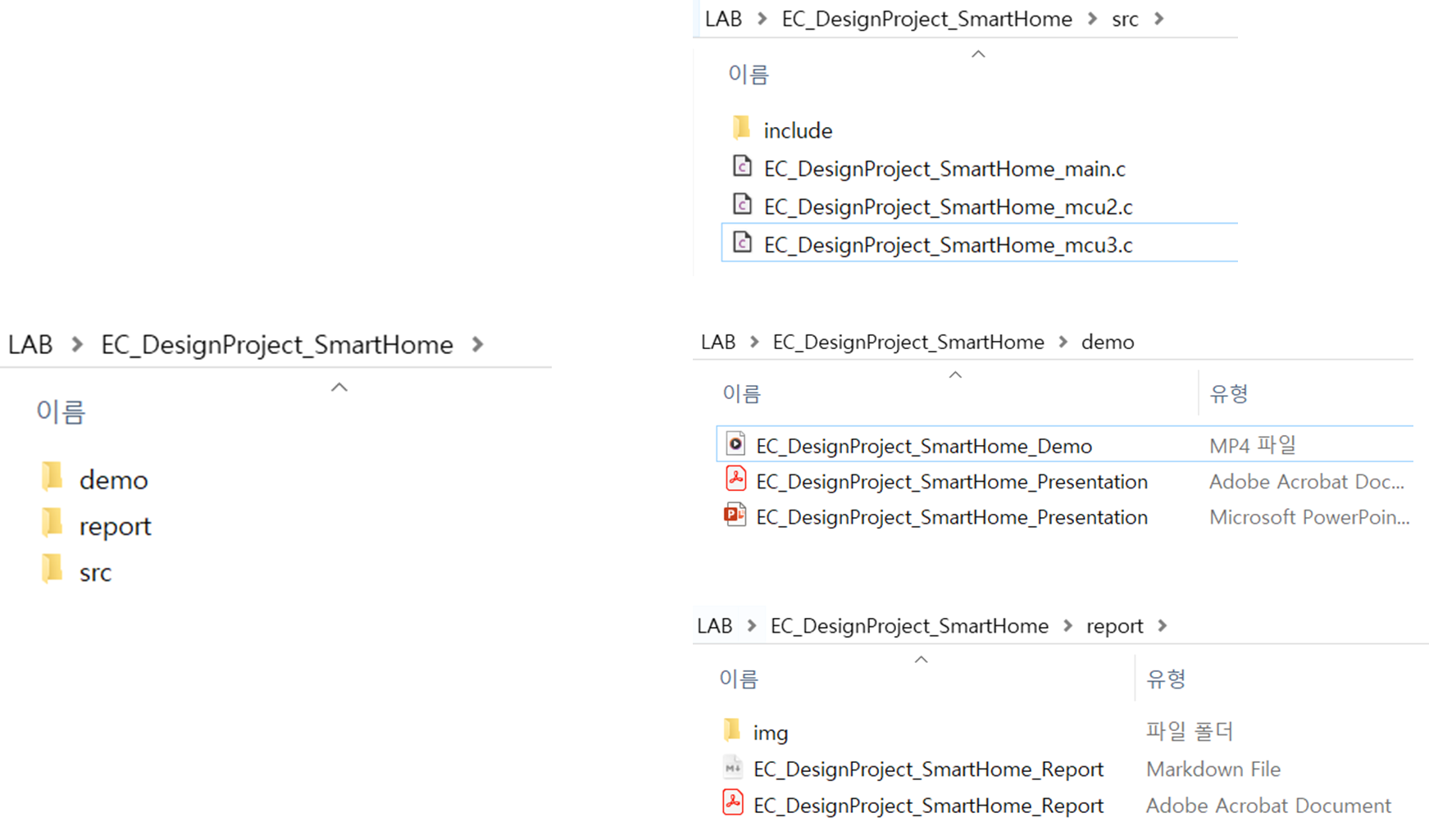
## What you need to submit
**`LAB_EC_DesignProject_KEYWORD.zip`**
1. **Report: `\report\`**
* \\`img` folder
* EC\_DesignProject\_KEYWORD\_Report.md
* EC\_DesignProject\_KEYWORD\_Report.pdf
2. **Source code: `\src\`**
* `\include`**folder**
* EC\_DesignProject\_KEYWORD\_main.c
* EC\_DesignProject\_KEYWORD\_mcu2.c, and others
3. **Presentation and DemoVideo: `\demo\`**
* EC\_DesignProject\_KEYWORD\_Presentation.ppt
* EC\_DesignProject\_KEYWORD\_Presentation.pdf
* EC\_DesignProject\_KEYWORD\_Demo. mp4 (기타 영상 확장자 가능)
#### Example: KEYWORD=SmartHome
***
##